
SuiteQL Report Publisher
Turn a SuiteQL query into a reusable NetSuite report with configurable columns, editor controls, and a cleaner end-user experience.
With the power of SuiteQL, you can finally eliminate those excel reports that must be built monthly via multiple exports and piecing together with VLookup Excel functions.
What It Does
SuiteQL Report Publisher is a self-contained NetSuite Suitelet that lets an admin:
- share a saved SuiteQL report with end users through normal deployment audience controls
- write or paste a SuiteQL query
- save one report configuration per deployment
- control which columns are visible
- configure labels, filters, and default sort behavior
- decide who can edit the configuration
Instead of handing people raw SQL, ad hoc CSV exports, or a script that only one admin understands, you get a report surface that can be reused.
Why Teams Use It
Useful SuiteQL often ends up in one of three bad states:
- buried in a script file
- copied around manually between admins
- rerun every time someone asks for a fresh export
SuiteQL Report Publisher gives those queries a usable home inside NetSuite.
How It Works
Each Suitelet deployment stores its own JSON config file in the File Cabinet. That config controls:
- report title
- SuiteQL query
- visible columns
- filters and sorting
- execution mode
- editor roles and employee access
- table styling and pagination
Users land in report view. Editors can open the configuration screen when changes are needed.
Configuration Experience
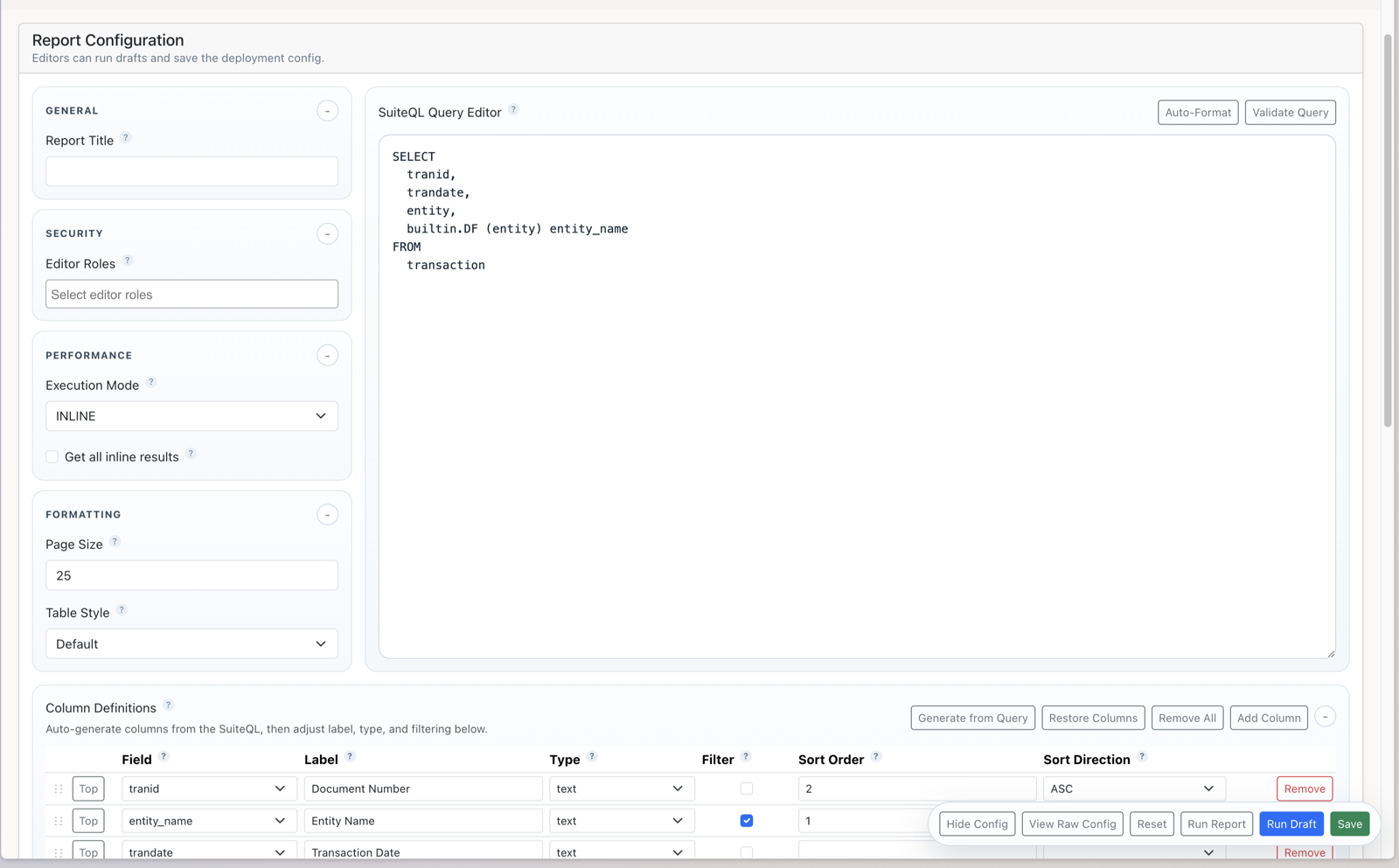
The configuration screen is designed for admins who want to iterate quickly without leaving NetSuite.
You can:
- edit the SuiteQL directly
- auto-format the query
- validate the query before saving
- generate columns from the query output
- reorder visible columns with drag and drop
- set labels, filters, types, and default sorting
- save the config and preview the saved report
Query Editor
The SuiteQL Query Editor is built for real admin work, not just a plain text box.
Features include:
- monospace editing
- auto-formatting
- query validation
- inline or async execution
- optional full-result paging in inline mode
- draft testing before saving
That makes it practical to refine a report directly in NetSuite instead of bouncing between notes, scripts, and spreadsheets.
Column Definitions
Column Definitions control what end users actually see.
That means:
- defined columns are visible
- undefined query fields remain hidden
- labels can be customized
- filtering can be enabled per column
- default sort order can be configured explicitly
Admins can generate columns from the query, restore saved columns, remove all, or manually add visible fields.
Inline or Async
The report supports two execution modes.
Inline
Best for queries with small result sets (less than 5000 results)
- runs directly in the Suitelet request
- gives quick feedback while designing a report
- can optionally configure to return all results (more than 5000), but often slower than switching to Async option
Async
Best for larger data sets or complex queries
- starts a NetSuite async export
- shows elapsed time and execution status while waiting
- loads the exported results back into the report view
- UI is completely responsive while waiting
- Sometimes faster than Inline option even with fewer than 5000 results
If the goal is extracting a high-volume result set instead of iterating interactively, async mode is usually the right choice.
Editor Access vs Viewer Access
The tool separates configuration mode from report view.
That means:
- end users are always sent directly to the report view
- editors can open configuration only when needed
- administrators always retain configure access
- edit access can be granted to additional roles or specific employees
This helps teams publish reports without exposing setup controls to everyone who uses them.
Raw Config for Power Users
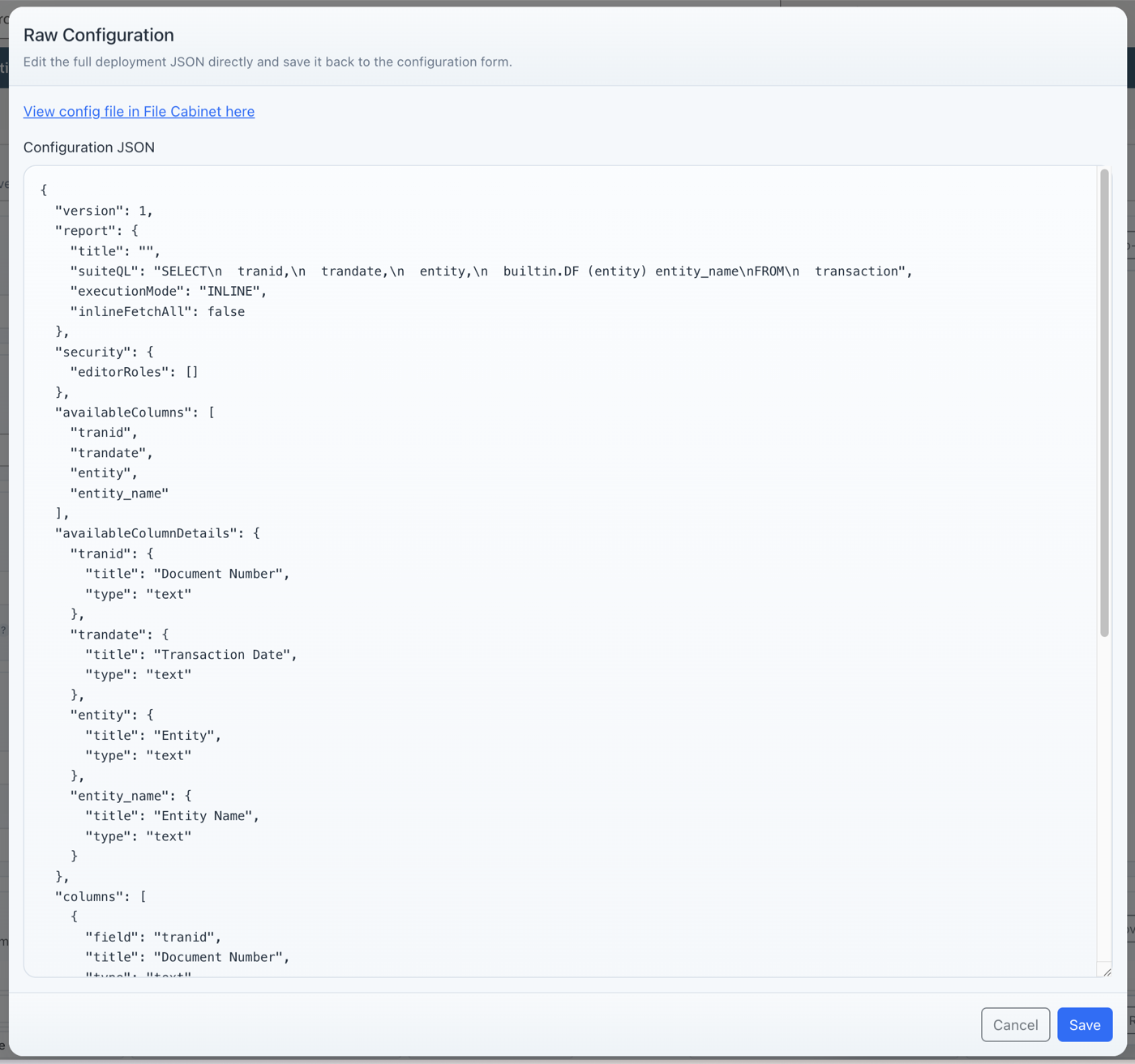
For admins who want lower-level control, the tool also includes a raw JSON config editor.
That makes it possible to:
- inspect the exact saved config
- make bulk changes quickly
- review stored editor roles and report structure
- open the underlying File Cabinet config record directly
Why It Works Better Than a Static CSV
Instead of generating one export at a time, this gives you a reusable reporting surface with:
- repeatable report access
- configurable columns
- browser-side filtering
- CSV download from the rendered results
- visible timing and execution feedback
It is a strong fit for teams who already know how to write SuiteQL and want a better way to publish those results inside NetSuite.
Good Fit Use Cases
- operational reports built from SuiteQL
- finance and transaction review queries
- admin-owned internal dashboards
- report prototypes before a larger customization
- replacing repeated “can you export this query again?” requests
What It Is Not
- a replacement for saved searches when a native NetSuite report already does the job well
- a no-code reporting tool for teams that do not know how to write or validate SuiteQL
- a full BI platform with cross-system modeling, scheduled distribution, and external warehouse workflows
Installation Model
The utility is designed to stay lightweight:
- self-contained Suitelet runtime
- no custom records required
- per-deployment JSON config file
- no shared runtime library dependency
That keeps deployment simpler while still giving each report deployment its own saved behavior.
Install and Source
Download the main Suitelet source file
Delivery Model
This utility is a strong fit when:
- your team already writes SuiteQL and wants a better publishing surface
- you need reusable internal reports without exposing raw query logic to end users
- you want admins to control report behavior without turning every change into a development request
If you need help adapting the utility, hardening a query, or fitting it into a broader reporting workflow, we can help with that too.