
Workflow Gotchas
Use this page when a NetSuite workflow looks logically correct but still skips expected behavior.
When Unchecked Does Not Equal F
Symptom: A new checkbox field can evaluate as null on existing records, not F. If your workflow condition checks only MY_FIELD = F, those records may not match until they are updated.
Why it happens: Newly added checkbox fields on untouched records often remain null-valued until a write occurs.
Practical fix: Run a mass update on existing records so the checkbox value is explicitly set and workflow conditions evaluate consistently.
Bill Payments Can Switch to Pay Bills After Submit
Symptom: A bill payment workflow behaves correctly in earlier trigger points, but an after-submit action such as an email notification never runs.
What the workflow history shows: On bill payments created from the Pay Bills page, the earlier trigger points may show Create, but the after-submit trigger can show Pay Bills instead.
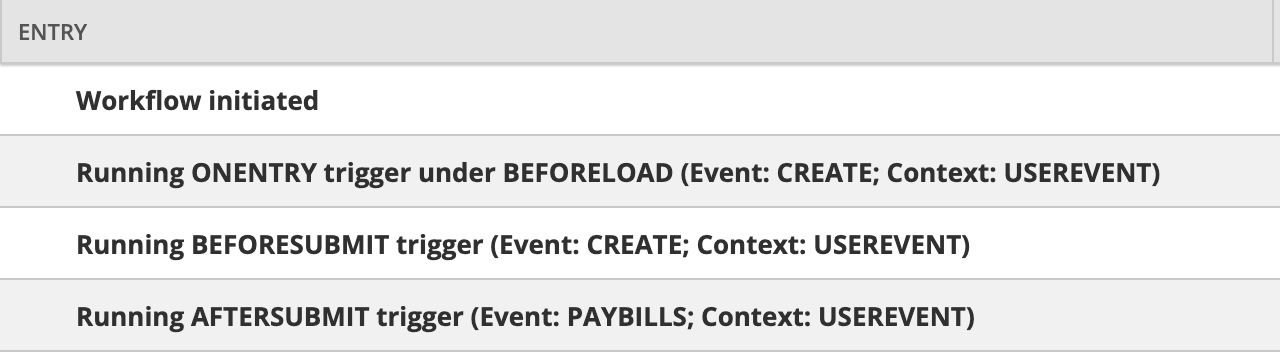
Why it matters: If the after-submit action is filtered to run only on Create, NetSuite can skip it even though the bill payment was just created from an admin point of view.
Practical fix: Check the workflow history for the exact trigger point where the action runs. If the after-submit event is Pay Bills, include Pay Bills in the workflow filter for that action.
Date Fields May Need TO_DATE(...) in Workflow Conditions
Symptom: A custom field used in a workflow condition is definitely a Date field, but the condition formula still does not compare it correctly once the field has a real value.
What changed the investigation: The useful pivot was moving from “did the notification show up?” to “what does the workflow history log say?” That exposed the actual error and made the formula issue easier to isolate.
Working pattern:
TO_DATE({entity.custentity__vra_date}, 'YYYY-MM-DD HH24:MI:SS')Where this was observed: This was confirmed in a workflow condition field. It may also apply in other NetSuite formula fields, but the confirmed case here was specifically a workflow condition.
Why it is surprising: The field itself is already typed as Date, but the workflow condition formula still may need explicit coercion. In this case, that held up even when comparing stored versus non-stored behavior.
Practical fix: If a custom date field behaves strangely in a workflow condition formula, try wrapping it in TO_DATE(...) before assuming the field is unavailable or mistyped.
Process fix: For temporary debugging, remove the on Create context filter so the workflow can be triggered on an existing purchase order by refreshing or reloading the record. Workflow history is not available on a newly created record until after save, so testing only on create can slow down troubleshooting.