
NetSuite Pay Bills Workflow Event Type Gotcha
Here is a small workflow detail worth filing away if you build NetSuite workflows around vendor payments.
If a workflow is triggered when a user creates a bill payment from the Pay Bills page, the event type may not stay as simple as Create for every workflow trigger point.
That matters if your workflow sends email, creates follow-up activity, or runs other logic after the bill payment is submitted.
The Scenario
A client wanted a notification email to send when a bill payment was created.
That is a reasonable workflow use case:
- base record: bill payment
- trigger: create
- action: send a notification email
- timing: after submit
The workflow looked right on paper, but the email was not sending.
What the Workflow History Showed
The important clue was in the workflow history logs.
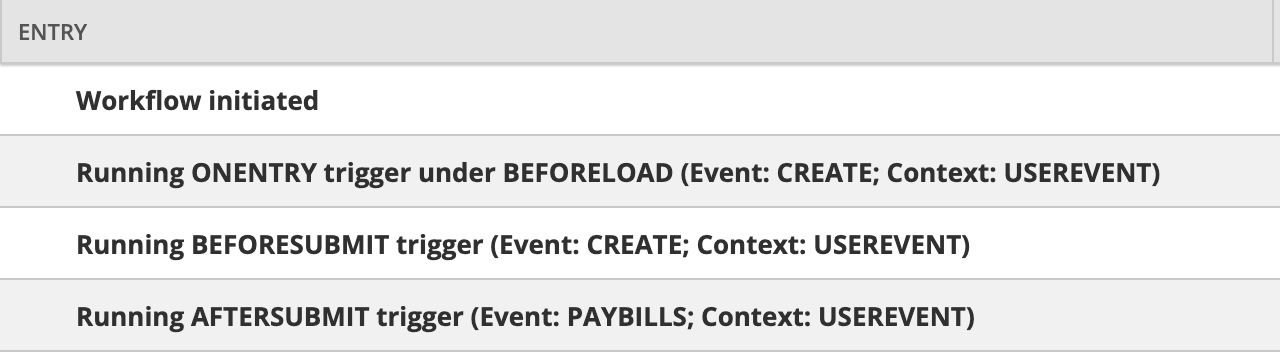
The earlier trigger points were running under the Create event:
- before load
- before submit
But by the time the workflow reached the after-submit trigger point, the event had changed to Pay Bills.
The Fix
If your after-submit workflow action is filtered to run only on Create, it may be skipped when the payment comes from the Pay Bills page.
For this case, updating the workflow filter to run on Pay Bills allowed the after-submit email action to run as expected.
Practical Rule
When a workflow behaves correctly in earlier trigger points but skips after-submit actions, check the workflow history before changing the action itself.
For bill payments created from the Pay Bills page, confirm the event shown at the exact trigger point where your action runs.
The event type you need for before-submit logic may not be the event type you need for after-submit logic.
Quick Troubleshooting Checklist
Use this when a workflow on bill payment creation does not fire as expected:
- Open the workflow history for the affected bill payment.
- Compare the event shown for before load, before submit, and after submit.
- Confirm the action is attached to the trigger point you think it is.
- Check whether the action or transition has an event-type filter.
- If the after-submit event is
Pay Bills, includePay Billsin the workflow filter for that action.
Where This Usually Bites
This is easy to miss because “a bill payment was created” sounds like a Create event from an admin perspective.
From the workflow engine’s perspective, the Pay Bills page can surface as its own event type at after submit.
That mismatch is enough to make a workflow look correct while still silently skipping the action you care about.